Working with data in code
The Jetveo platform utilizes Entity Framework for data access and management.
Representation in code
Data you define in the Data section will be available in code.
- Entities represented as classes with the same name
- Aspects represented as interfaces with the same name
- Codebooks represented as enum-like classes with the entries being the codebook codes
Working with the database
In the code, you have access to the Application Database. It is passed to you as an argument in Business Commands and in simple expressions. You can then pass it as an argument to your custom code.
The type of the database object is AppDatabase.
Get database data
For each entity defined in data, there is a corresponding entity table. Accessible at db.ExampleEntitySet
db.ExampleEntitySet is an IQueryable object. You can further specify what objects you want to get by doing queries. More about queries
Most common queries
Where(x => condition(x))Contains elements, for which the passed lambda expression is true.Count(x => condition(x))Returns the number of elements, for which the lambda evaluates to true.Any(x => condition(x))Returns a boolean value: true if any object x specified by the lambda exists, false otherwise.FirstOrDefault(x => condition(x))Returns the first element, that satisfies the condition. Otherwise returns null or other specified default value.SingleOrDefault(x => condition(x))Returns the only single element, for which the condition is true. Otherwise returns null or other specified default value.
Query modifiers
For performance enhancement, it is possible to use a few queries, that do not change the semantics, but can dramatically influence the performance.
Include
By default, references are lazy-loaded. This means, that the referenced entity will be loaded only
when it's accessed. (With a separate query.) However, using the Include modifier, nested entities
can be included in the single query. (The database performs a join)
Default: Get Entity -> Query 1 -> Access Entity -> Get Entity Reference -> Query 2 -> Access Entity Reference
Default: Get Entity -> Query 1 -> Access Entity -> Access Entity Reference
ThenInclude
If you want to include even more nested entities, you can chain Include and ThenInclude for the deeper
nesting. It is possible to chain multiple ThenIncludes, Include is always the top level. Chaining
ThenIncludes can only result in a path graph. In order to branch out, specify all paths from the top-level
Include.
AsSplitQuery
As joins can become very large, sometimes it's better to split a query with large joins into multiple
queries with smaller joins with AsSplitQuery. This can either improve or worsen the performance.
This is not thread safe: splitting a query can also lead to data inconsistency between the respective queries, as the query is no longer atomic and a change can occur in-between the queries.
Select (Not really a query modifier)
If you don't need all attributes, you can exclude them from the query with select providing a lambda
function that only returns the needed attributes. This can be useful when
joins would lead to duplication of large data. Most likely not needed.
Working with navigation collections
Collection references — Composition, Aggregation, Entity collection and Codebook collection — appear
in code as ICollection<T> properties on the parent entity (e.g. order.OrderItems). These are navigation
collections: they are backed by the database and behave differently from an in-memory list.
Deferred loading
Navigation collections are deferred. Accessing the property does not query the database. The query runs
only the first time you actually inspect the collection's contents — enumerating it (foreach, LINQ), reading
Count, or checking membership.
Crucially, adding or removing items does not trigger a load. You can append to a collection without first downloading every related record:
// No query is executed here — not on access, not on Add.
order.OrderItems.Add(new OrderItem() { Product = product, Quantity = 1 });
This makes appending to large collections cheap. The collection only materializes if you enumerate it:
foreach (var item in order.OrderItems) { ... }   // First touch: one query loads the items
int count = order.OrderItems.Count;              // Already loaded: no extra query
When enumerated, the collection reflects your pending (not-yet-saved) Add/Remove changes merged with the
persisted rows.
Querying server-side with .Query()
For large collections where you only need a filtered subset, a count, or an existence check, enumerating the whole
collection just to filter it in memory is wasteful. Use the .Query() extension to query the collection
server-side instead — the operators are translated to SQL and the collection is never materialized:
// SQL COUNT — does not load any OrderItem into memory.
int expensive = order.OrderItems.Query().Count(i => i.Price > 100);

// SQL EXISTS.
bool hasBackorder = order.OrderItems.Query().Any(i => i.Status == OrderItemStatus.BACKORDER);

// SQL WHERE — materializes only the matching rows.
var recent = order.OrderItems.Query()
    .Where(i => i.CreatedAt >= since)
    .OrderByDescending(i => i.CreatedAt)
    .ToList();
.Query() returns an IQueryable<T>, so all the query modifiers and common queries described
above apply. Entities returned from .Query() are the same tracked instances you would get by enumerating the
collection directly (reference identity is preserved).
Important:
.Query()reflects the persisted state only. Items you haveAdded orRemoved on the collection but not yet saved are not taken into account. If you need pending changes included, enumerate the collection directly (which merges them) or calldb.SaveChanges()first.Name the method
Query()— notAsQueryable(). The latter binds to LINQ's in-memoryEnumerable.AsQueryable, which would materialize the whole collection and defeat the purpose.
Entity collections filled from a query
A command model's Entity collection can hold a query instead of stored records - a Data grid batch command
receives its selection that way. .Query() works on it the same way and keeps the whole selection in the
database, while enumerating the collection itself loads at most 1000 records. See
Entity collection limit.
Modifying the database
Add
You can add an entity object to the database by calling db.ExampleEntitySet.Add(entity)
Documents
When creating an entity object, the document fields are implicitly set to null. When adding it to the database,
the document are set to IDocument objects with 0 revisions. To assign an actual document, use the AddRevision method on the IDocument object.
Delete
You can delete an element, or a collection of elements:
Delete(x)Deletes the elementx.DeleteRange(xs)Deletes all elements fromIEnumerable<T> xthat are in the db table.
We generally advise against using these methods, because they are destructive. Instead, we recommend adding an attribute deleted, as you can ignore the objects with this attribute set, while still allowing for their restoration.
Modify
You can modify an entity object in the database by setting a value to some of it's field.
If this change violates any requirement defined in the App (Invalid state transition, Forbidden null reference...), this action will throw an exception.
For a state machine like this:
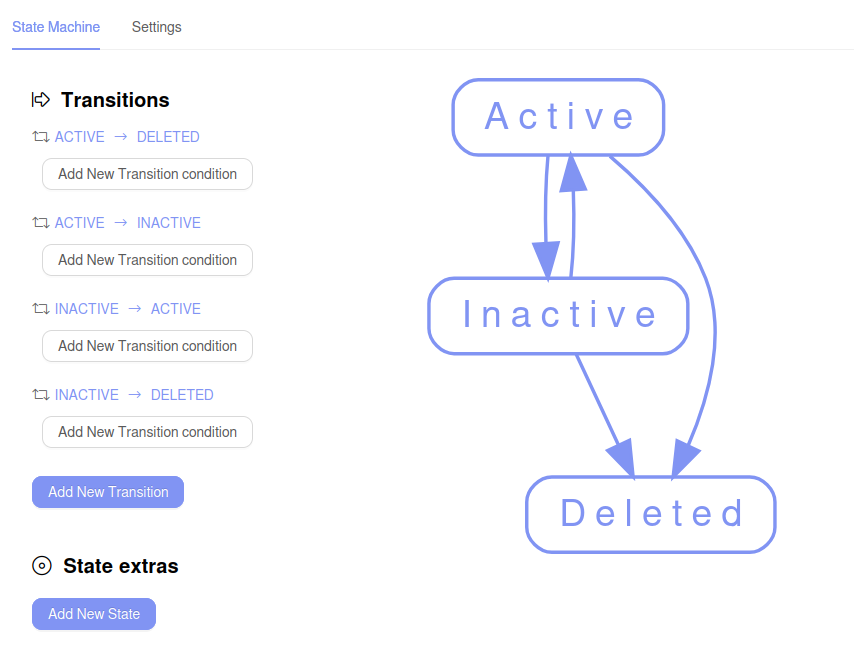
The following code will throw an exception. Unless the exception is handled, the command will fail.
var deletedEntity = db.ExampleEntitySet.FirstOrDefault(x => x.Status == ExampleCodebook.DELETED);
if (deletedEntity != null)
{
    deletedEntity.Status = ExampleCodebook.ACTIVE;
}

Staged transactions
The changes to the database (Adding, modifying, deleting) an element will be staged. The changes will apply only after the code has been successfully executed. (No uncaught exceptions, No negative result returned).
If you add an element x to the database, you won't be able to find it until the staged changes are made.
public void ExampleDbAdd(AppDatabase db, long Id)
{
    var exampleObject = db.ExampleEntitySet.Add(new ExampleEntity() { ExampleId = Id }); // Adds to the database
    bool inDatabase = db.ExampleEntitySet.Any(x => x.ExampleId == Id);                   // false
    ...
}
After this method is executed, the exampleObject will be added to the database, but inDatabase will evaluate to false
Local collection
Keeping track of the staged changes is often useful.
Any entity accessed in code (through a query, or .Add()) is loaded in memory, and tracked.
The tracked entities are stored in the entity table .Local. Referring back to the previous case,
the queries will evaluate as shown below.
public void ExampleDbAdd2(AppDatabase db, long Id)
{
    var exampleObject = db.ExampleEntitySet.Add(new ExampleEntity() { ExampleId = Id }); // Adds to the database
    bool inDatabase = db.ExampleEntitySet.Any(x => x.ExampleId == Id);                   // false

    bool inLocal = db.ExampleEntitySet.Local.Any(x => x.ExampleId == Id);                // true
    ...
}
A commonly used pattern in a command is checking the local database for an object, and then looking into the application database. This might come useful when parsing data in a command, and collision control is needed.
var found = db.ExampleEntitySet.Local.FirstOrDefault(x => x.ExampleId == Id)   // Note the Local collection use
              ?? db.ExampleEntitySet.FirstOrDefault(x => x.ExampleId == Id);   // Fallback to DB query
Apply changes
To apply staged transactions (write the tracked entities into the database) before the command ends, you can use:
db.SaveChanges();
This also flushes all the tracked entities from the memory and empties the .Local collections. This solves issues with
importing large data by reducing memory consumption; You can periodically flush the memory throughout
the import using db.SaveChanges().
const int threshold = 256;
int count = 0;

foreach (var dataChunk in data)
{
    ImportData(db, dataChunk); // Does some data importing action

    count++;
    if (count % threshold == 0)
    {
        db.SaveChanges();
    }
}
Apply changes without event propagation
db.SaveChangesWithoutEventPropagation();
This method applies changes during the command execution, but does not trigger business events. Useful for mass imports or performance optimization